Behavior Driven Development Pycharm Python Django
Apr 12, 2016 15:59 · 1180 words · 6 minute read
This article is a continuation of my first post about TDD in PyCharm with Python and Django. Here I will outline how behaviour driven development in PyCharm can be used in a scrum environment. However, scrum itself is another topic, but I will use these processes as a canvas.
Disclaimer
I am neither an affiliate of JetBrains nor any of their products. In fact, I am a little disappointed with the most recent release of YouTrack and the number of critical bugs that they have, even now, after months of work. I am not saying that PyCharm or YouTrack or any other JetBrains products is flawless (clearly not) but these are the tools I found, which worked the best for my team and me.
Defining requirements
Before getting to the specs I need to commit requirements.txt file @2d6c959 Let’s start by defining our goals. The previous article defined requirements quite briefly so let’s elaborate on it a little more; There is another blog post that speaks about the way to describe the requirements which I will be using. For the time being, I will use . For the time being, I will use the Gherkin Syntax to create a few features.
In the previous post we’ve built an API so it’s time to do a catalogue now.
Feature: products catalogue
  To provide access to products
  As Any User
  I want to browse products catalogue

  Scenario: products on homepage
    Given there are set of Products in Database
      | id | title     | description   | price |
      | 1  | Product 1 | description 2 | 10    |
      | 2  | Product 2 | description 3 | 20    |
    When I go to /
    Then the page includes "Product 1"
    And the page includes "Product 2"

  Scenario: product detail page
    Given there is a Product in database
      | id | title     | description   | price |
      | 1  | Product 1 | description 2 | 10    |
    When I go to /products/1/
    Then the page includes "Product 1"
    And the page includes "description 2"
    And the page includes "10$"
This is a valid behave feature file which defines a catalogue feature and two scenarios of how can I use this feature. By the way, adding a file in PyCharm is Option ⌥ + Command ⌘ + A. Commit is Command ⌘ + K. Find commit here @850c187.
Good start, the suit can be ran with Control ⌃ + Option ⌥ + R in the PyCharm.
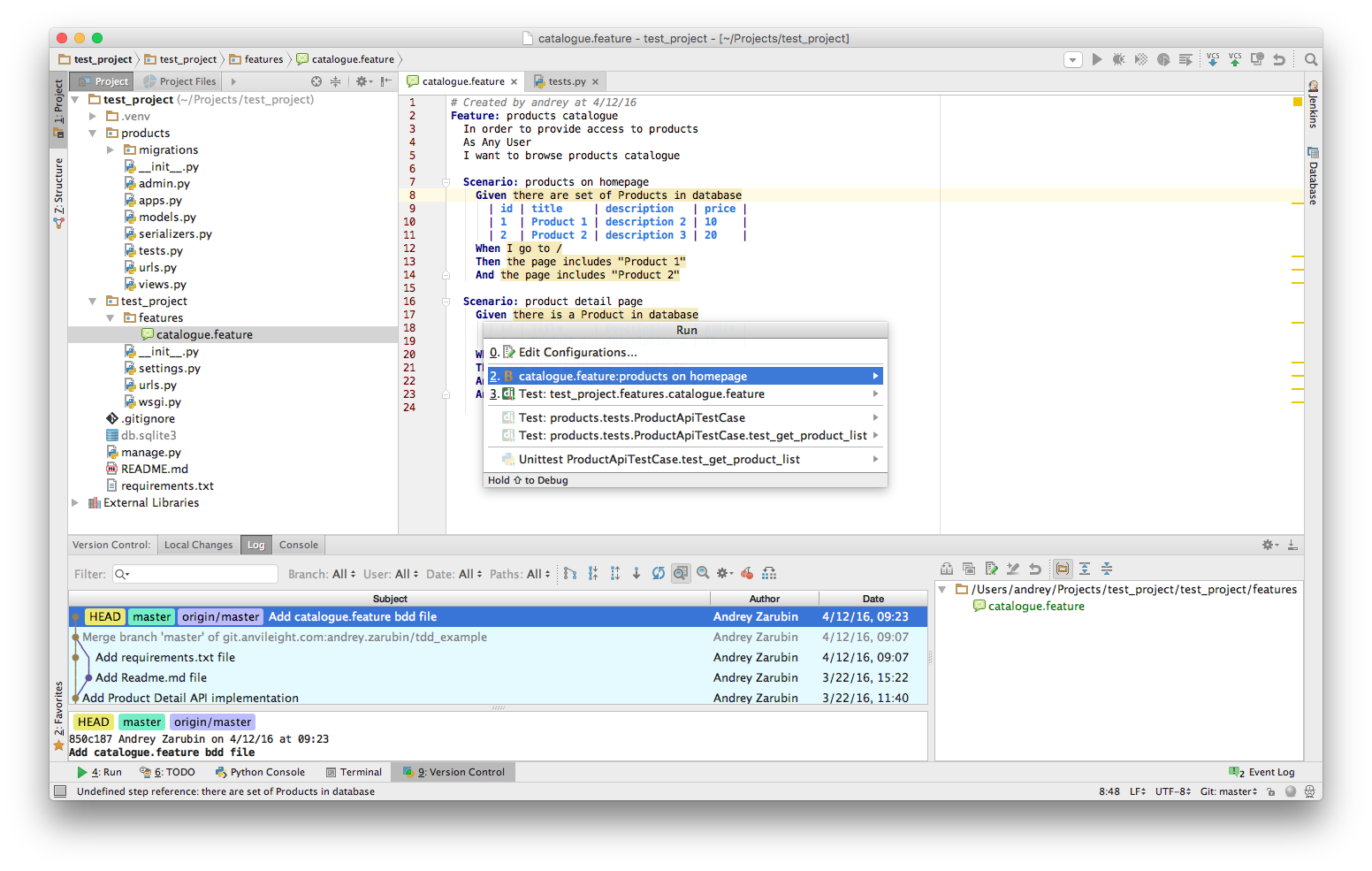
Of course, tests are failing which is good.
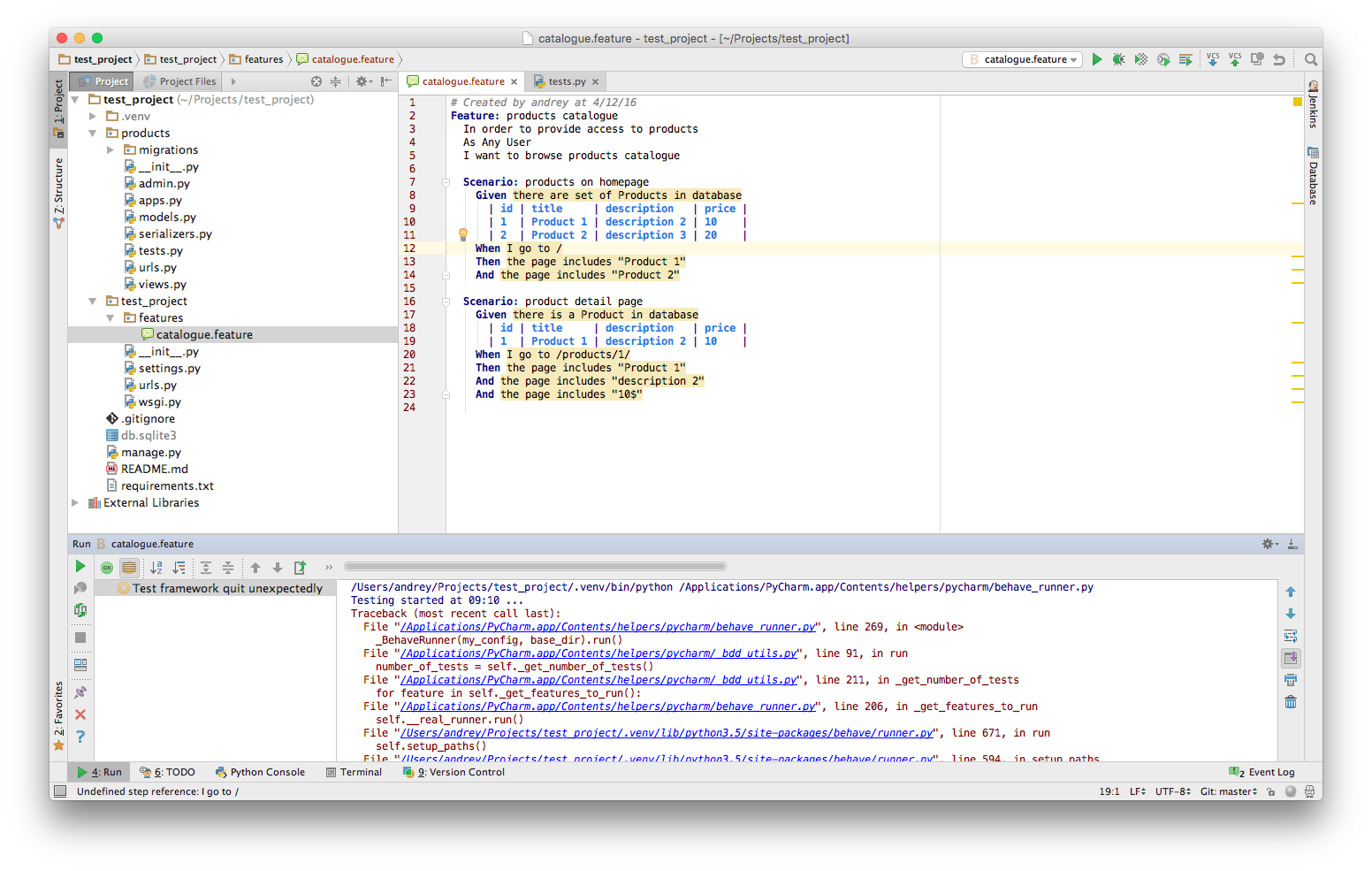
The error message is
Traceback (most recent call last):
    ...
behave.configuration.ConfigError: No steps directory in
    "/Users/andrey/Projects/test_project/test_project/features"
Which means there is nothing to execute yet.
Making behave tests work
Ok, now let’s generate implementation steps for the Feature. First, let’s create features/steps folder with
__init__.py in it. That will allow PyCharm to suggest creating implementation steps. It is easy to create steps
by navigating to highlighted expressions in feature file and press Option ⌥ + Enter. PyCharm suggest you
create a step for particular expression.

For some reasons Create all steps definition does not work as expected. It creates some definitions for certain phrases but not all of them. Must be a bug or something. So I used Create step definition option. Now, we have blank steps defined for every step. Let’s run them @850c187d

They are passing now. Which is expected but not very good. I don’t know why PyCharm team decided to put pass as
default implementation like this:
@step('the page includes "Product 2"')
def step_impl(context):
    """
    :type context: behave.runner.Context
    """
pass@step('the page includes "Product 2"')
def step_impl(context):
"""
:type context: behave.runner.Context
"""
assert FalseI have modified steps that suppose to assert something to assert False. Now tests are failing. @b2c4ee24

Django context configuration
It is time to configure behave. Let’s run behave tests inside the Django context. To do so we have to add environment.py and several lines in it (@043ac7b)[https://git.anvileight.com/andrey.zarubin/tdd_example/commit/043ac7b76226dee74453f6cf923110bfeb5720f2]:
import os
import django

os.environ['DJANGO_SETTINGS_MODULE'] = 'test_project.settings'


def before_all(context):
    django.setup()
Another good thing would be to create setup and teardown methods just like typical test cases. In these methods, we will be creating test database each time we run tests and delete it when tests finished. There are many other things that could be done but let’s keep it simple for now. In this example, we will use DiscoverRunner, but I think it might not work for older versions of Django:
from django.test.runner import DiscoverRunner


def before_all(context):
    django.setup()
    context.test_runner = DiscoverRunner()
    context.test_runner.setup_test_environment()
    context.old_db_config = context.test_runner.setup_databases()


def after_all(context):
    context.test_runner.teardown_databases(context.old_db_config)
    context.test_runner.teardown_test_environment()
We have database managed now @6c471b3
And one more thing that could be added is an ability to run scenarios in transactions and roll them back after each scenario. That’s fairly simple too:
from django.test.testcases import TestCase


def before_scenario(context, scenario):
    context.test = TestCase()
    context.test.setUpClass()


def after_scenario(context, scenario):
    context.test.tearDownClass()
    del context.test
I think we are pretty much done with a configuration so let’s get into implementation of the steps.
Behave scenarios implementation
One nice thing about PyCharm is that it highlights patterns. I’ve modified my test for common case and PyCharm
automatically recognised which parts of the statement are variables. Now I can re-use that @given statements for
any model to create my test data.
@6058808c
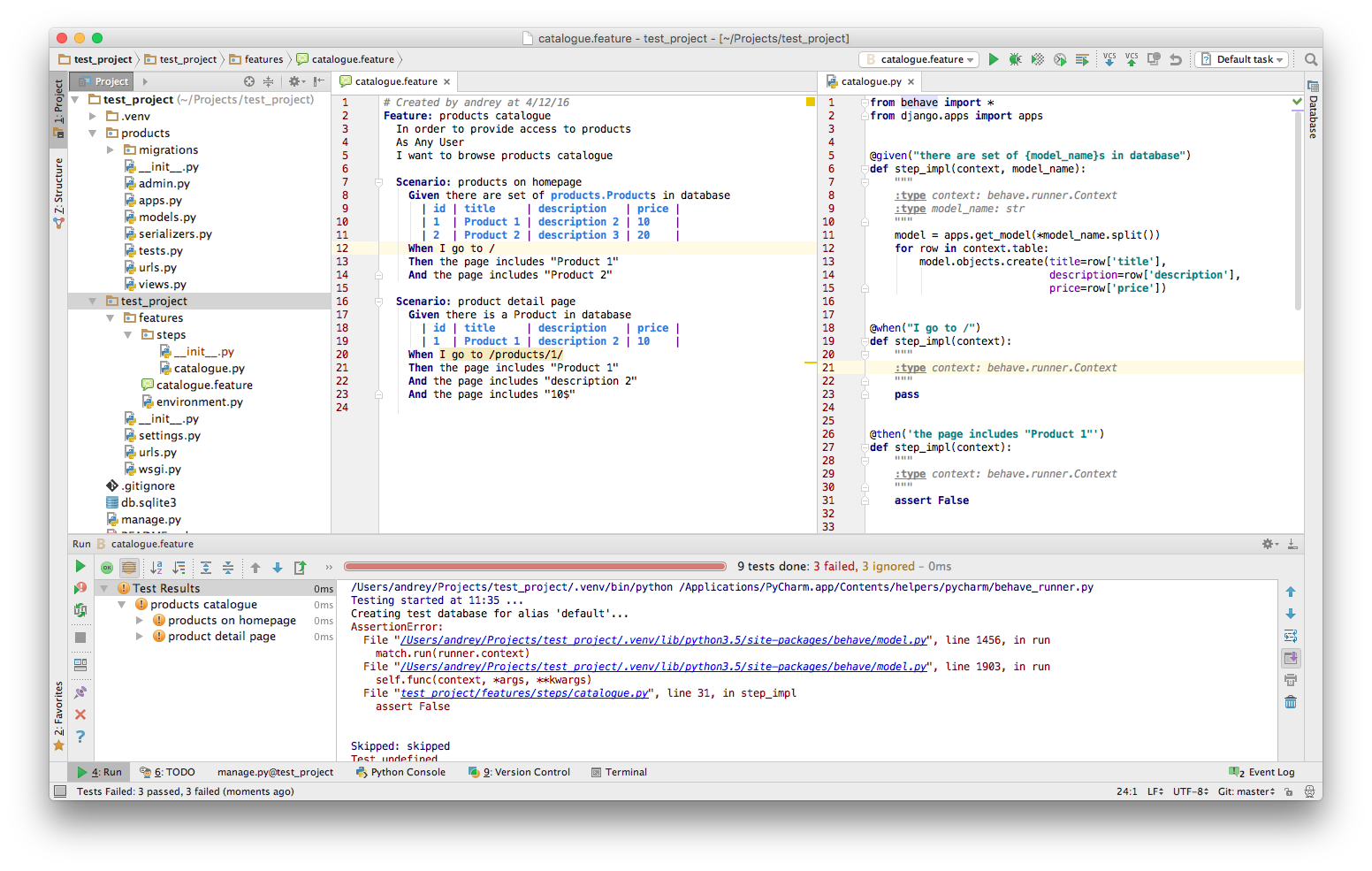
The next step will be implementing the navigation. One thing that is missing is the server we can send requests to.
But since we have everything in place it is only a matter of changing a test case class in environment.py to
LiveServerTestCase. Sending requests to that server will be using urllib.
@2281145
@when("I go to /")
def step_impl(context):
    """
    :type context: behave.runner.Context
    """
    context.response = urllib.request.urlopen(
        context.test_case.live_server_url)
Let’s run it!

We’ve got an exception:
HTTPError: HTTP Error 404: Not Found
This is a good sign. This means we actually have a test server running and are able to request it. The last step is to assert the response. Let’s go through the same with the second scenario. I’ve re-factored a little bit and I’ve also added implementation for the second scenario @2281145
Generally speaking it is possible to write behave tests in such a way that allows you to reuse your code often. But that’s another entirely another subject.
Actual feature implementation
The actual implementation took maybe half an hour in total. Since it is just a demo, my intent was to show BDD practices rather than coding of the features. Finally I have tests passing at my last commit @9cbdbf31 I have added actual API endpoints and corresponded implementation.
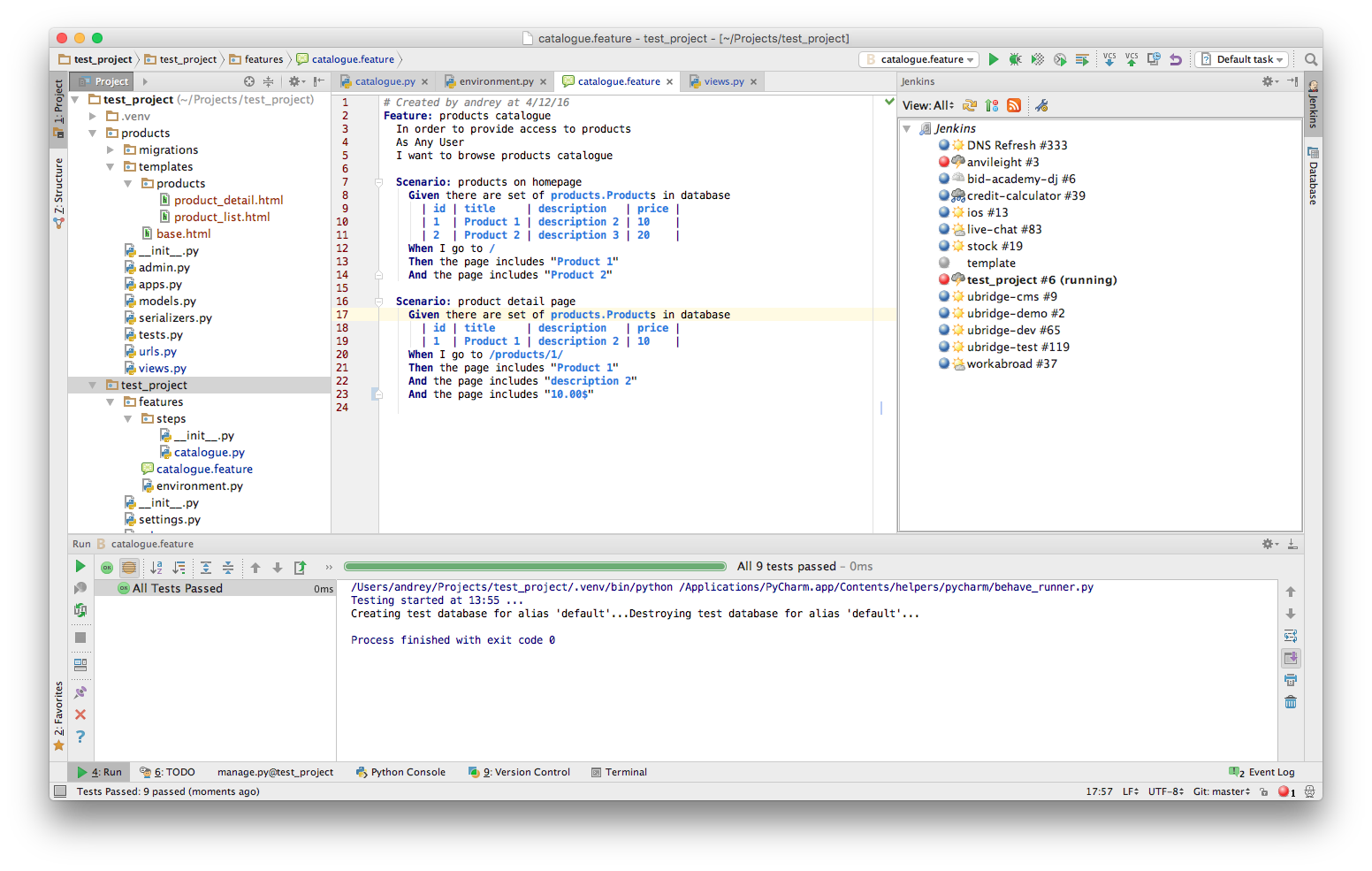
It worked!